
Project submissions in Singapore that fail compliance checks frequently trigger Written Directions from regulatory authorities, halting approvals and extending project timelines by weeks or months. For property developers and construction managers, non-standard or incomplete Building Information Modeling (BIM) models are the single most common source of these setbacks. This guide outlines a structured, step-by-step approach to preparing BIM models that satisfy Singapore’s regulatory requirements across the BCA, URA, and CORENET X platform, covering everything from initial data gathering and template selection to clash detection, model coordination, and final submission.
Table of Contents
- Understand BIM compliance requirements in Singapore
- Get your data, templates, and tools ready
- Step-by-step: How to prepare your BIM model
- Verification, troubleshooting, and submission tips
- Why the real challenge in BIM preparation is coordination, not software skill
- Get expert help with BIM modeling and compliance
- Frequently asked questions
Key Takeaways
| Point | Details |
|---|---|
| BIM compliance is essential | Preparing BIM models to compliance standards avoids costly delays and resubmission in Singapore projects. |
| Use official templates | Always base your BIM models on the latest URA and BCA templates for smooth approval. |
| Coordinate submissions | QP-led, federated model submissions through CORENET X minimize risks of Written Directions. |
| Verify before submitting | Thoroughly check for clashes and compliance parameters before uploading your BIM model. |
Understand BIM compliance requirements in Singapore
With the importance of BIM preparation established, let’s examine exactly what you need to meet compliance standards set by Singapore’s regulatory authorities.
BIM compliance in Singapore refers to the requirement that digital building models submitted for statutory approval conform to prescribed standards regarding model accuracy, parameterization, discipline coordination, and data completeness. These requirements are not advisory. They are mandatory conditions that determine whether a project can proceed through the approval pipeline without interruption.
The key regulatory authorities overseeing BIM submissions include:
- BCA (Building and Construction Authority): Governs structural and architectural building plan submissions, including mandatory BIM requirements for projects exceeding a certain Gross Floor Area (GFA) threshold.
- URA (Urban Redevelopment Authority): Administers planning permission and GFA compliance, requiring BIM models to pass through the GFA AutoChecker tool before approval is granted.
- CORENET X Platform: Singapore’s integrated digital submission portal where Qualified Persons (QPs) lodge federated BIM models across disciplines for multi-agency review.
Understanding how these agencies interact is critical. A submission that satisfies BCA structural requirements but fails URA’s GFA AutoChecker will still be rejected. The building plan submission requirements set out by each authority must be addressed simultaneously, not sequentially.
Several specific compliance checks occur during submission review:
- Clash detection: All discipline models (architectural, structural, mechanical, electrical, and plumbing) must be federated and checked for spatial conflicts. Federated submissions must be clash-free and have correct parameters to avoid Written Directions and delays.
- Correct parameterization: Elements such as rooms, walls, slabs, and openings must carry specific data parameters that regulators use for automated checking.
- GFA compliance: Floor area calculations must align precisely with URA’s computational rules. The URA GFA AutoChecker BIM Modelling Guidelines specify Revit templates and workflows that ensure correct GFA attribution.
- Model completeness: All levels, grids, and system elements must be properly defined and linked across disciplines before submission.
Understanding these checks in advance allows teams to build compliance into the modeling process from the start, rather than retrofitting corrections at the end. The structural design approval process in Singapore also feeds directly into the BIM submission workflow, making early coordination between architectural and structural QPs essential.
Regulatory note: Regulatory authorities in Singapore have the authority to issue Written Directions when submitted models contain coordination errors, incorrect parameters, or incomplete data. Each Written Direction adds time and cost to the project and creates a formal record of non-compliance.
Pro Tip: Submit federated models that integrate all discipline outputs, not isolated single-discipline models. Reviewers check the combined model for coordination, and incomplete federations are a leading cause of immediate rejection.
Get your data, templates, and tools ready
Now that you know what is required by regulators, prepare your setup so the modeling process runs without unnecessary interruption or rework.

Proper preparation before modeling begins eliminates a significant proportion of compliance errors. Teams that attempt to gather data, finalize design briefs, and select templates mid-project regularly encounter conflicts between model elements and regulatory requirements that are expensive to resolve.
Software and plugins required:
- Autodesk Revit (current release as required by BCA/URA specifications)
- Navisworks Manage for federated model clash detection
- URA GFA AutoChecker plugin (compatible with the applicable Revit version)
- BCA-endorsed IFC export settings configured within Revit
Project data to collect before modeling begins:
- Verified site survey data including topographic levels and boundary coordinates
- Architectural design brief with confirmed GFA allocations per use type
- Structural system description and preliminary foundation type
- M&E system schematics and spatial requirements
- Applicable planning conditions from URA or relevant competent authority
- Fire safety requirements as prescribed by SCDF
Singapore-specific resources:
- URA GFA AutoChecker BIM Modelling Guidelines, which specify the exact Revit templates and parameter configurations required for GFA compliance
- BCA’s e-submission requirements document for the applicable project category
- CORENET X portal user guide for QP-managed federated submissions
The following table summarizes the essential tools and documents required before modeling begins:
| Item | Type | Source | Purpose |
|---|---|---|---|
| Autodesk Revit (current version) | Software | Autodesk | Primary modeling platform |
| URA Revit Template | Template file | URA website | GFA-compliant room and element setup |
| BCA Structural Template | Template file | BCA e-services | Structural model parameterization |
| URA GFA AutoChecker Plugin | Plugin | URA website | GFA verification before submission |
| Navisworks Manage | Software | Autodesk | Clash detection across disciplines |
| Site Survey Data | Project data | Licensed surveyor | Accurate site geometry and levels |
| Planning Conditions Document | Regulatory data | URA | Confirms allowable uses and GFA limits |
| CORENET X Portal Access | Portal account | BCA CORENET | Submission and multi-agency review |
A proper BIM modeling setup that incorporates all of these elements from the outset reduces the probability of mid-project template conflicts that force model rebuilds. Similarly, confirming 3D BIM model readiness standards before the first element is placed saves substantial rework later in the process.
Pro Tip: Always verify that you are using the latest version of BCA and URA templates before starting. Template specifications are updated periodically, and using an outdated version will cause AutoChecker failures regardless of how accurately the model is built.
Step-by-step: How to prepare your BIM model
Once you have all tools and templates in place, follow a proven sequence that builds a compliance-ready model from the ground up.
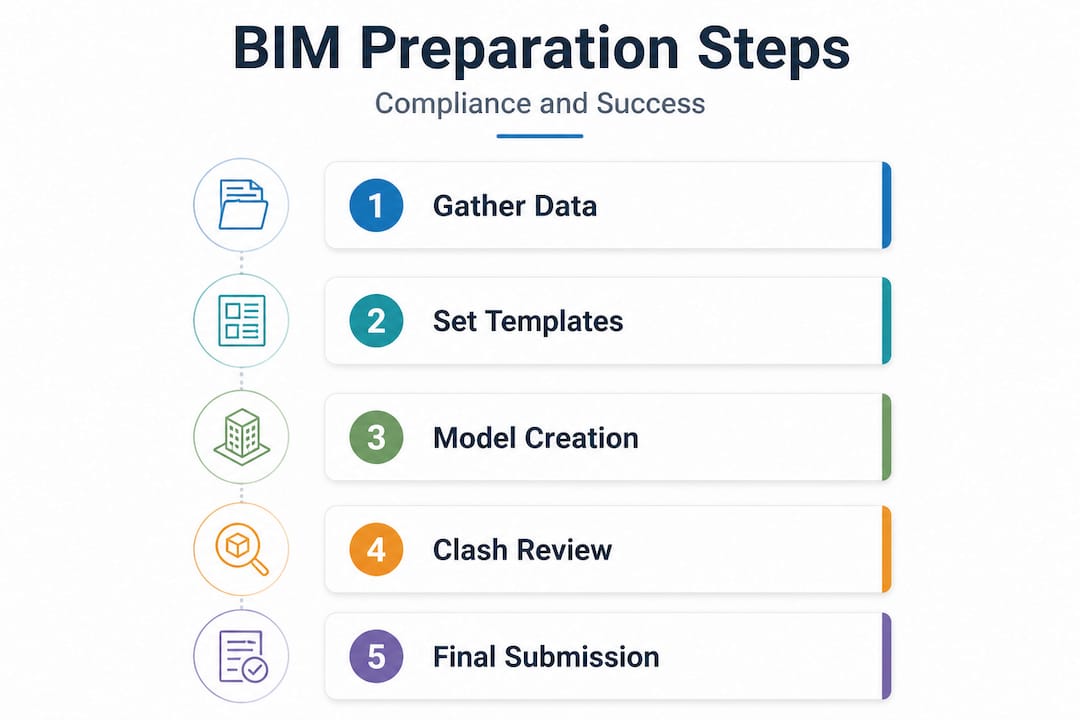
The following numbered sequence reflects the workflow that consistently produces clean, submittable BIM models for Singapore regulatory review:
-
Import the official URA and BCA Revit templates into the project environment. Do not modify parameter names, family types, or level naming conventions defined in these templates, as the AutoChecker and CORENET X system rely on exact data matches.
-
Set up the project base point and survey point using verified site survey coordinates. Incorrect georeferencing is a common cause of federated model misalignment between architectural and structural models.
-
Define all project levels and grids in the architectural model first, then link and copy monitor these levels into structural and M&E models. This ensures consistent vertical datum references across all discipline files.
-
Model architectural elements (walls, slabs, columns, openings, and rooms) using the element families and parameters specified in the URA template. Assign correct GFA classifications to all room elements at this stage.
-
Run the URA GFA AutoChecker on the architectural model before proceeding to structural or M&E modeling. Identify and resolve any GFA attribution errors, room boundary issues, or classification mismatches.
-
Develop the structural model in a separate Revit file, linked to the architectural base. The QP supervision responsibilities for the structural engineer include verifying that all structural elements are correctly parameterized per BCA requirements.
-
Develop M&E models (mechanical, electrical, plumbing, and fire protection) as separate discipline files linked to the architectural base.
-
Federate all discipline models in Navisworks. Run a comprehensive clash detection analysis covering hard clashes (physical intersections), soft clashes (clearance violations), and workflow clashes (sequencing conflicts).
-
Resolve all identified clashes by coordinating with respective discipline modelers. Document the resolution status for each clash item as part of the submission record.
-
Compile the federated submission package via the CORENET X portal. The QP (Architect/PE) coordinates federated submissions via CORENET X; models must be clash-free with correct parameters to avoid Written Directions and delays.
-
Conduct a final model audit using Revit’s built-in audit function to identify and purge unused families, resolve warnings, and confirm that all linked files are current.
-
Submit via CORENET X with all required documentation, including the QP declaration, project particulars, and any supporting compliance reports.
The following comparison table illustrates why template-based approaches consistently outperform manual setup:
| Approach | GFA Compliance Rate | Average Clash Resolution Time | Risk of Written Direction |
|---|---|---|---|
| Manual parameter setup | Low | High (multiple rework cycles) | High |
| Template-based with AutoChecker | High | Moderate (structured workflow) | Low |
| Template-based with full coordination | Very high | Low (issues caught early) | Very low |
For projects with complex program requirements, maintaining a construction compliance checklist aligned to each submission stage prevents items from being overlooked. Proper shop drawing management later in the project also benefits from the discipline coordination habits established during BIM preparation.
Pro Tip: Schedule clash detection reviews at the end of each modeling milestone, not just at the point of final submission. Early detection keeps resolution time short and avoids cascading errors when changes in one discipline affect others.
Verification, troubleshooting, and submission tips
After completing your BIM preparation, double-check your work and focus on a clean, well-documented submission to minimize review queries.
Final checks before submission:
- Confirm the GFA AutoChecker produces zero errors on the final architectural model
- Verify all mandatory parameters are populated: room names, use types, element types, levels, and fire compartment assignments
- Check that all linked files in the federated model are loaded and current, with no missing references
- Confirm that the project base point coordinates match the licensed surveyor’s site data
- Review the CORENET X submission checklist to confirm all required documents are attached
Top submission errors and how to resolve them:
- Unresolved clashes in the federated model: Return to Navisworks, confirm all clash reports are marked as resolved, and re-export updated discipline models before re-federating.
- Incorrect GFA classifications: Open the architectural Revit file, review all room parameters against URA’s GFA AutoChecker rules, and rerun the checker after corrections.
- Missing or misnamed parameters: Compare the model’s shared parameter file against the URA/BCA template’s shared parameter definitions and re-apply any missing entries.
- Outdated linked files: Reload all linked Revit files from their current saved locations before exporting the federated model.
- Incorrect IFC export settings: Use only the BCA-endorsed IFC export configuration. Do not use Revit’s default export settings, which omit required parameter mappings.
Critical submission requirement: As confirmed by e-BIM submission guidance, the QP coordinates federated submissions via the CORENET X portal, and models must be clash-free with correct parameters to avoid Written Directions and delays. A single unresolved clash or missing mandatory parameter is sufficient grounds for a Written Direction, which pauses all approval activity until the deficiency is formally corrected and resubmitted.
Best practices for the CORENET X upload process:
- Log in to CORENET X under the QP’s registered account, not a general project account
- Upload discipline models in the prescribed order: architectural first, followed by structural, then M&E
- Attach the federated model as a separate file, clearly labeled per the naming convention in the portal guidelines
- Complete all project metadata fields before uploading files to avoid form validation errors
- Download and retain the portal’s submission confirmation receipt immediately after upload
Consulting the developer compliance checklist before initiating the CORENET X upload is a reliable method for confirming that all regulatory touchpoints have been addressed for the project type and agency requirements involved.
Pro Tip: Prepare a submission log that records each file version, the date it was uploaded, and the clash report reference associated with it. This log becomes invaluable if authorities raise queries about specific model elements during review.
Why the real challenge in BIM preparation is coordination, not software skill
Stepping back from the technical steps, there is a deeper issue shaping project outcomes that most teams underestimate until they encounter it directly.
The most persistent source of BIM submission failures is not a lack of Revit proficiency or unfamiliarity with the GFA AutoChecker. It is the breakdown in coordination between the parties responsible for different discipline models. Architectural teams finalize room layouts while structural engineers are still working off preliminary floor plans. M&E consultants receive incomplete information and model based on assumptions that conflict with the architectural design. By the time the QP attempts to federate the models, the number of clashes requiring resolution reflects weeks of parallel work conducted in informational isolation.
Regulatory submissions in Singapore require a level of model coordination that cannot be achieved through technical skill alone. The QP’s facilitation role is central to this. A QP who actively sets coordination milestones, enforces shared level and grid standards from week one, and conducts regular interdisciplinary model reviews will consistently produce cleaner submissions than a technically excellent team working without structured coordination. The insights from digital engineering practice in Singapore consistently confirm that the projects with the fewest Written Directions are those where coordination was treated as a formal project management function, not an informal expectation.
The practical recommendation is to establish a BIM Execution Plan (BEP) at project inception. This document should define model ownership by discipline, shared parameter standards, link management protocols, coordination meeting schedules, and clash resolution workflows. Teams that operate with a BEP reduce mid-project rework substantially and arrive at the submission stage with models that reflect genuine interdisciplinary coordination rather than last-minute patchwork. The investment in process governance early in the project is, without question, the highest-return action available to developers and construction managers seeking smooth regulatory approval.
Get expert help with BIM modeling and compliance
If you want faster, smoother BIM submissions in Singapore, professional guidance makes all the difference in reducing rework and accelerating approval timelines.

Aman Engineering Consultancy provides end-to-end support for BIM modeling and regulatory compliance, from initial template setup and discipline coordination through to clash detection, GFA verification, and CORENET X submission management. Our team works directly with project QPs to ensure federated models meet BCA and URA standards before they reach the portal. Clients who engage our BIM modeling solutions benefit from structured workflows that are aligned with current regulatory requirements, reducing the probability of Written Directions and associated project delays. Our 3D BIM modeling services and value engineering service offerings are designed specifically for the Singapore construction environment, providing the technical and coordination support that development teams need to deliver compliant, cost-effective submissions.
Frequently asked questions
What is a clash-free BIM model and why is it important?
A clash-free BIM model contains no spatially conflicting elements between discipline models, ensuring that the federated submission meets the requirement that models be clash-free and have correct parameters to avoid Written Directions and regulatory delays.
Which software should I use to prepare BIM models for Singapore compliance?
Autodesk Revit, configured with the official URA GFA AutoChecker templates, is the required primary modeling platform for meeting Singapore BIM submission standards across both BCA and URA regulatory requirements.
Who is responsible for coordinating BIM model submissions?
The Qualified Person, either the project architect or professional engineer, is responsible for managing and lodging federated submissions via CORENET X and ensuring that all discipline models comply with applicable regulatory standards before upload.
How do I avoid Written Directions during BIM submission?
Verify that the model is clash-free with correct parameters and that all mandatory GFA classifications, element types, and project data fields are accurately completed and consistent across all discipline files before uploading to CORENET X.
Where can I find Singapore’s official BIM guidelines and templates?
The latest Revit templates and technical specifications are available for download directly from the URA GFA AutoChecker BIM Modelling Guidelines page on the URA website, and should be reviewed for updates before each new project commences.