

Level of Development (LOD) governs how much a model’s geometry can be trusted; Level of Information (LOI) governs how much data that geometry carries. A model is only fit for its intended use when both are specified together.
- Design and coordination teams rely primarily on LOD to confirm geometry is accurate enough for clash detection and spatial decisions.
- Facility management and procurement teams rely primarily on LOI, since asset data, not visual detail, drives maintenance and ordering.
- Grounding standard: the BIMForum LOD Specification, the AIA’s E201 definitions, and ISO’s Level of Information Need framework are the three references every BIM Execution Plan should cite.
Key Takeaways
Model fitness for downstream use depends on specifying LOD and LOI together in the BEP, not treating geometric maturity as a stand-in for data completeness.
| Point | Details |
|---|---|
| LOD and LOI are distinct | LOD governs geometric reliability; LOI governs the non-geometric data attached to it. |
| Use mixed-LOD deliberately | Reserve LOD 350 or 400 for coordination-critical or fabrication elements, not the whole model. |
| Specify LOI by element type | List required properties for doors, MEP equipment, and ducts directly in the BEP. |
| Validate before handover | Require COBie or IFC exports and run mandatory field checks before milestone sign-off. |
| Get outside review when needed | Aman Engineering Consultancy offers BEP review and model QA to catch LOD/LOI gaps before they cause rework. |
Table of Contents
- LOD vs LOI Explained: Definitions Every BEP Should Cite
- How LOD and LOI Combine: The LOD = LOG + LOI Concept
- LOD 100 to 500: Geometry, Information, and Accuracy Expectations
- How to Choose Between LOD 300, 350, and 400
- How to Specify LOI in a BIM Execution Plan
- Common LOD and LOI Pitfalls That Break Downstream Workflows
- A Pre-Submission QA Checklist for Model Authors
- Why Getting This Balance Right Changes Project Outcomes
- Get Your BEP or Model Reviewed Before It Costs You Rework
- Where to Go for the Full Standards
- Frequently Asked Questions
- Sources
LOD vs LOI Explained: Definitions Every BEP Should Cite
LOD stands for Level of Development, the metric that describes how far a model element’s geometry has matured and how reliably it can be used for a given decision. The BIMForum LOD Specification frames LOD 100 through 500 as a scale of geometric maturity and element reliability, not a mandated project timeline. Some countries use “LOD” to mean “Level of Detail” instead, which muddies conversations across international teams, so confirm which definition a project uses before specifying anything.
LOI, Level of Information, covers the non-geometric data attached to that geometry: manufacturer, fire rating, warranty period, maintenance interval, GUID. ISO’s Level of Information Need guidance gives practitioners a structured way to define exactly how much information a given deliverable requires.
A third term, LOG (Level of Geometry), describes visual detail alone, independent of whether that geometry is trustworthy for a specific use. Cite all three standards directly in your BEP:
- BIMForum LOD Specification, for geometric maturity levels
- AIA E201, for contractual LOD definitions
- ISO 75403 (Level of Information Need), for information requirements
How LOD and LOI Combine: The LOD = LOG + LOI Concept
Trimble’s widely cited explanation frames LOD as the sum of LOG and LOI, using a kiwi fruit as the analogy: the fruit’s shape and skin (LOG) tell you what it looks like, but only cutting it open (LOI) tells you if it is ripe. A model can look finished and still be functionally useless.
Two situations show why this matters. A visually dense MEP model with rich geometry but no manufacturer data or GUIDs will pass a design review yet fail procurement, because purchasing teams cannot generate an accurate bill of materials from it. Conversely, a simple placeholder object carrying complete asset data can serve facility management perfectly well long before its geometry is refined.
- Geometry-heavy, data-poor models look impressive but stall downstream workflows.
- Simple geometry with complete metadata often outperforms detailed geometry with none.
Pro Tip: Before locking a model element’s LOD, ask what decision the element supports. If the answer is “ordering” or “maintenance,” prioritize LOI over geometric polish.
LOD 100 to 500: Geometry, Information, and Accuracy Expectations
Each LOD level carries cumulative geometry and information requirements, meaning LOD 350 must satisfy everything LOD 300 requires, plus more. A practitioner guide on LOD 300 vs 350 vs 400 lays out the accuracy and cost tradeoffs practitioners face at each stage.

| LOD Level | Geometry | Typical LOI Fields | Common Use |
|---|---|---|---|
| 100 | Conceptual massing, no shape accuracy | Area, volume, orientation | Feasibility, early cost estimates |
| — | Approximate size, shape, location | Generic manufacturer, quantity | Schematic design |
| 300 | Precise size, shape, orientation | Specific product data | Design development, permit submission |
| 350 | Interfaces with adjacent systems modeled | Connection and interface data | Interdisciplinary coordination, clash detection |
| 400 | Fabrication-ready detail | Fabrication and installation data | Shop drawings, prefabrication |
| 500 | As-built condition | Full asset data, warranty, GUID | Facility management, handover |
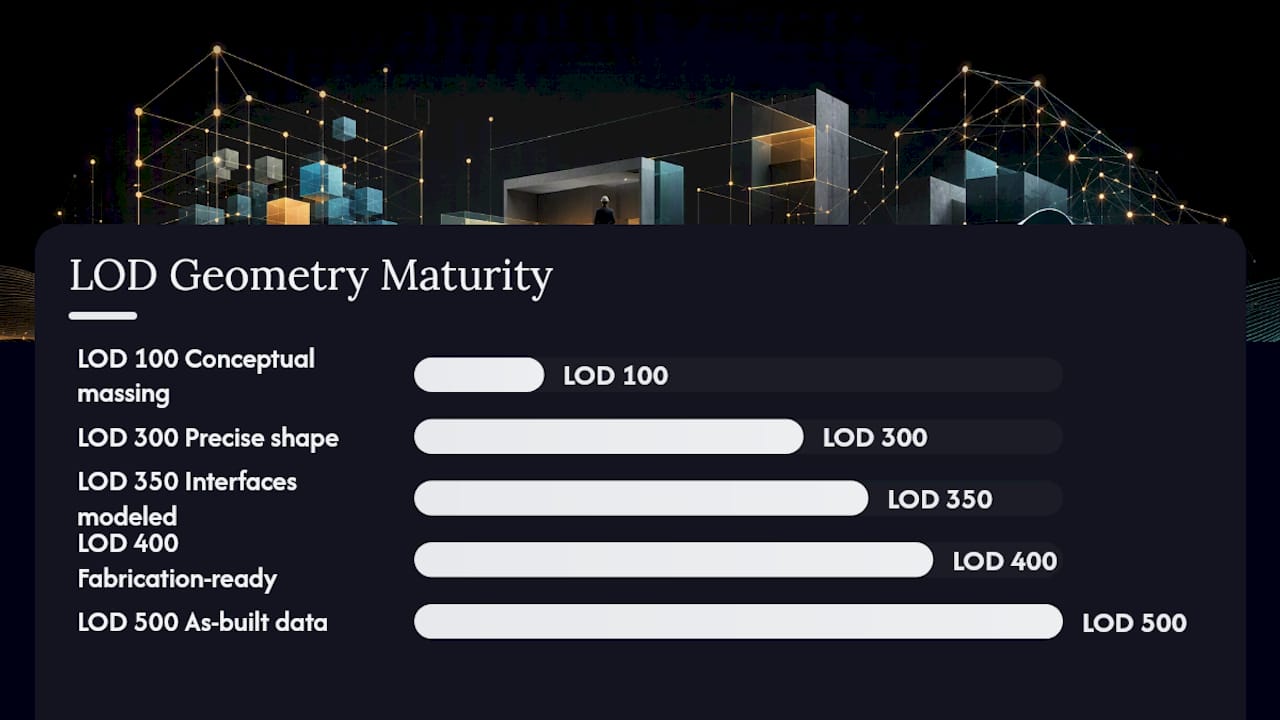
Not every element needs the same level. A well-run project keeps envelope systems at LOD 300 while pushing congested MEP zones to LOD 350, a practice known as mixed-LOD modeling.
How to Choose Between LOD 300, 350, and 400
The right LOD depends entirely on the decision the model must support, not on habit or template defaults.
- Identify the downstream decision. A permit submission needs defensible geometry and code-compliant data; a fabrication order needs dimensional precision down to the connection.
- Match LOD to that decision, not to the whole model. Reserve LOD 350 or 400 for elements where the added precision changes an outcome.
- Specify LOI alongside LOD for every element type. Geometry without data still fails procurement and FM handoff.
Three scenarios illustrate this:
- Permit submission: LOD 300 typically satisfies code review requirements without the cost of full interface modeling.
- MEP coordination in congested ceilings: LOD 350 is justified because clash detection depends on interface geometry, not just bulk shape.
- Prefabrication and shop drawings: LOD 400 is required, since fabricators need exact connection and installation detail.
Reserve LOD 400 for elements actually being fabricated. Applying it project-wide inflates file size and schedule for no measurable benefit.
How to Specify LOI in a BIM Execution Plan
A BEP that names LOD without naming required properties leaves LOI open to interpretation, which is where scope disputes start. Specify minimum property sets per element type directly in the deliverable matrix.
- Doors: fire rating, hardware set, manufacturer, warranty, GUID
- MEP equipment: capacity, model number, connection type, maintenance interval
- Ducts: material, insulation type, size, airflow rating
Require COBie exports or controlled IFC property sets as the validation format, with mandatory fields and GUIDs checked before acceptance. A working BEP clause might read: “All MEP equipment delivered at LOD 350 shall include manufacturer, model number, and maintenance interval as validated COBie fields prior to milestone sign-off.”
Pro Tip: Link every LOI requirement to a specific deliverable and milestone in the BEP. An LOI clause with no deliverable attached to it never gets enforced.
Common LOD and LOI Pitfalls That Break Downstream Workflows
Most model usability failures trace back to a handful of repeated mistakes.
- Conflating LOD and LOI in the BEP language, leaving teams unsure whether “LOD 350” includes data requirements. Fix: define both terms separately, every time.
- Over-modeling entire files to a single high LOD. Fix: apply mixed-LOD strategically, reserving high detail for coordination-critical zones only.
- Under-specifying mandatory LOI fields, leaving procurement teams to guess. Fix: attach a property checklist to every element category.
- Skipping COBie/IFC export validation before handover. Fix: run automated property checks before every milestone submission.
Pro Tip: Automated model-health checks that flag missing GUIDs or empty property fields catch LOI gaps long before they reach a client review.
A Pre-Submission QA Checklist for Model Authors
Before any deliverable goes out, run these six checks:
- Geometry meets the stated LOD’s tolerance for that element category.
- Mandatory LOI fields are populated for every scheduled object.
- COBie or IFC exports validate without missing property errors.
- Clash detection has run against adjacent systems where LOD 350 applies.
- Author and revision date metadata are current on every element.
- Element-level LOD tags match what the BEP specifies for that milestone.
Two BEP snippets worth adopting:
- MEP coordination: “Ductwork and piping in shared ceiling zones shall be modeled at LOD 350 with interface data validated before the coordination milestone.”
- FM handover: “All mechanical equipment shall carry LOD 500 geometry and complete COBie asset data, including warranty and maintenance schedule, prior to handover.”
Why Getting This Balance Right Changes Project Outcomes
Projects that separate LOD and LOI requirements in the BEP generate fewer RFIs during construction, because contractors and fabricators are not left guessing what “LOD 350” actually includes. The pattern shows up repeatedly: teams that specify information requirements as carefully as geometry spend less time on rework during coordination and handover. If your BEP language is vague on either point, it is worth a second look before the next milestone.
Get Your BEP or Model Reviewed Before It Costs You Rework
Aman Engineering Consultancy provides BEP review and model QA specifically to catch the LOD and LOI gaps that cause RFIs and rework later in a project.

Where other teams discover mismatched geometry and missing property data during coordination meetings, a structured review catches it before the model reaches that stage. An engagement typically delivers a marked-up BEP with element-level LOD and LOI clauses, a QA checklist tuned to your project’s deliverables, and sample validated exports your team can use as a template going forward. Turnaround depends on project scope, but most BEP reviews complete within a matter of days rather than weeks.
If your current BIM Execution Plan does not specify LOI requirements separately from LOD, that is the first thing worth fixing. Visit Aman Engineering Consultancy’s BIM modeling services to request a BEP review or model QA engagement, or explore how the team supports digital engineering workflows from design through handover.
Where to Go for the Full Standards
- BIMForum LOD Specification: the primary reference for LOD 100 to 500 definitions.
- AIA E201 LOD interpretations: expanded, cumulative LOD text including LOD 350.
- ISO Level of Information Need: the international standard for specifying LOI.
- DSM modeling and LOD/LOI background: additional context on how geometry and information requirements interact in practice.
Frequently Asked Questions
What is the core difference between LOD and LOI?
LOD measures how reliable an element’s geometry is for a given use; LOI measures how much non-geometric data, like manufacturer and warranty information, is attached to that element.
Is LOD 300 or LOD 350 better for MEP coordination?
LOD 350 is generally justified for congested MEP zones because it includes interface and connection geometry needed for accurate clash detection. LOD 300 is usually sufficient for less complex systems.
Can a model have high LOD but low LOI?
Yes. A model element can carry detailed, accurate geometry while missing the property data needed for procurement or facility management, which is exactly the scenario the LOD = LOG + LOI concept describes.
Where should LOI requirements be documented?
LOI requirements belong in the BIM Execution Plan, ideally tied to specific element types, deliverables, and milestones, with validation through COBie or IFC property checks.
Does every element in a model need the same LOD?
No. Mixed-LOD modeling, applying higher LOD only to coordination-critical or fabrication elements, is standard practice and keeps file size and cost under control.
Sources
- LOD – Level of Development LOD Specification
- ISO standard entry (Level of Information Need / related standard)
Recommended
- Eurocode 7 (SS EN 1997) for Singapore ERSS: Ultimate Limit State (ULS) vs. Serviceability Limit State (SLS)
- Structural Redundancy and Progressive Collapse Checks in Permanent ERSS Design
- Essential As Built Verification Protocols for Permanent ERSS Prior to Top CSC Approval
- Leveraging AI and Machine Learning in Geotechnical Back-Analysis for ERSS Submissions